 Chestnut
Your agentic workhorse terminal. The heavy lifting, handled.
Let Chestnut stay on top of your agents, so you can stay focused on what really needs your attention.
- Claude Code
- Codex
- OpenCode
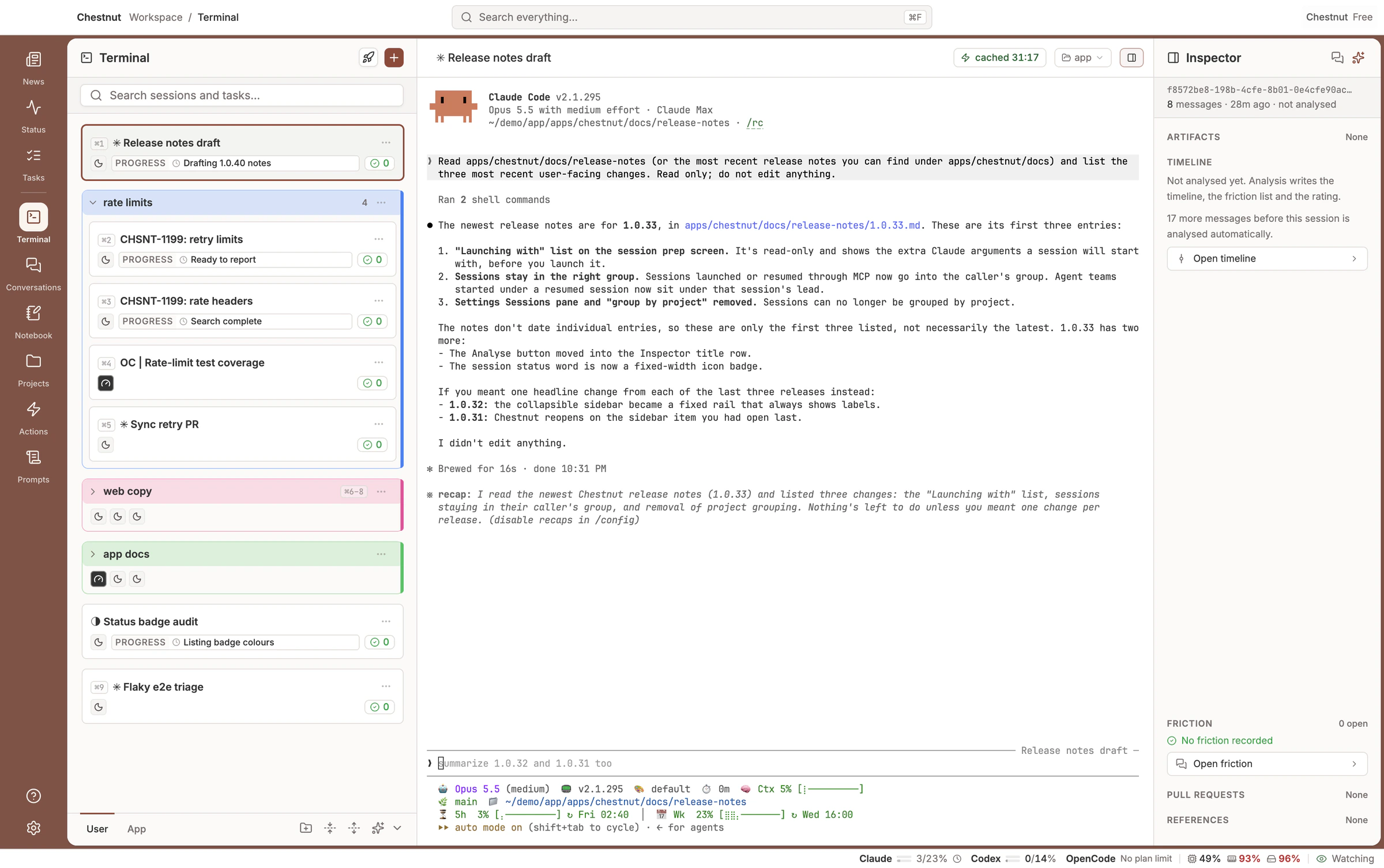
Chestnut was built in Chestnut
Your history, on your machine only
Chestnut easily runs with the coding agents you already pay for
Every agent, organized. Every session, on the record.
4 reasons you need Chestnut
Claude Code, Codex and OpenCode, organized in one window
Chestnut runs your agents side by side and keeps the work in order. Every session has a status badge and a group, and one click takes you to the one that is waiting. Behind each session sits its record: what it did, in its own timeline and summary.
- Groups and colours keep every agent's sessions in order, and the AI organizer proposes the groups
- Each plan's 5-hour and weekly usage in the status bar, and sessions that retry on their own after a rate limit
The Inspector: everything a session touches, right beside it
The Inspector is a panel that rides alongside every session. It gathers the pull requests, live CI checks, the ticket and the files the agent made, so you never leave the terminal to find out whether the work landed. Pull requests, tickets and files come from Claude Code sessions today, and pull requests from Codex; the rest of Codex and OpenCode next.
- Pull requests and their checks, live until they finish
- The ticket and every link the agent cited
- The files and artifacts the agent produced, ready to open
Every session and conversation, one search away
Type in the search field at the top of the window and results arrive grouped: sessions, messages, pull requests and tickets, artifacts, Notebook days, projects and prompts. Press ⌘↵ for the Search view, with every matching message and filters for project and date.
- One search across Claude Code, Codex and OpenCode conversations, including the history you already have
- ⌘F finds inside the open conversation or the focused terminal
- Your agent can search past conversations mid-session, and the Notebook writes up your day, every line linked to its session
See where work went wrong, and fix the setup, not the prompt
Chestnut reads each transcript for the interruptions, rejected tool calls and failing commands that slow your agents down, and points at the setup to fix: AGENTS.md, skills, commands or MCP config.
- Chestnut automations run on your own agents, and AI analysis pinpoints where a session went off course
- Turn a finding into a fix prompt, ready to run or to file as a GitHub issue
What you get with Chestnut
Starting work
- Quick Launch
- Saved prompts, each with its project, agent and model, one click from running.
- Reopen closed tabs
- Cmd+Shift+T brings back the tab you just closed.
- Keyboard first
- Cmd+T, Cmd+W and Cmd+1 to 9 open, close and switch between sessions.
Agents that drive Chestnut
- Chestnut's tools for agents
- An MCP server lets a session launch, search and group other sessions. Sessions Chestnut starts have it once you connect their agent, on first run or in Settings.
- Agent-set titles and colours
- A session can name its own card, caption its progress and pick its colour.
- Teams and helpers
- A Claude Code lead's teammates and any agent's helpers show as one badge on its card.
Your history
- Stays on your machine
- Your conversations live in a database on your computer, and Chestnut uploads none of them.
- Projects
- Group work by folder, and filter your history by project.
- Export to markdown
- An agent can write the sessions you pick to markdown files, with an index.
Make it yours
- Prompt library
- Keep your own prompts, and tune Chestnut's built-in ones with a reset to default.
- Themes and terminal font
- System, light or dark, and any monospace font and size for the terminal.
- Help built in
- The user guide opens inside the app and works offline.
Get Chestnut
The full local app is free for personal use, with no feature limits. Pro is a commercial-use licence for paid and business work. Read the licence.
Free
Personal projects, learning, students, and open source.
- The full app, with no feature limits
- The terminal: session launch, steering, and automations
- Full-text search across every project
- Friction analysis and trends across your projects
- AI summaries, the Notebook, and your agent's access to your own history
- Community support
Pro
or $96/yr when paid yearly, 20% off
Anyone being paid for the work, or doing it for a business.
- 30-day free trial
- Everything in Free
- Commercial-use licence for paid and business work
- A gold Pro badge in the app and across the websitesupporter perk
- Early access to beta builds
- Email support
- Funds more features and integrations
Pro starts with a 30-day free trial on your first Pro subscription. A payment method is required to start it, you are not charged during the trial, and you are charged automatically when it ends unless you cancel first. You can cancel at any time from your account page, and if Pro is not what you expected you can ask for a refund within 30 days of a charge. Pro checkout is available in the US and Canada. Refunds and cancellation.